links for 2007-07-04

Collaborative Conference Sessions

David Jakes has a post about the use of Skype during NECC sessions to capture thoughts and ideas of audience members (both in and out of the hall). He calls this ChatCast. On the way out of Atlanta, I ran into David at the airport and we talked about this and I mentioned to him a program called SubEthaEdit (you Hitchhiker's Guide to the Galaxy fans like Jim Gates might recognize the name... :-) ). Basically SubEthaEdit is a text editor, but it has the ability to allow folks to connect to, and edit simultaneously, a document. One user creates the document, and allows others to connect to it. The users can connect via an Internet connection, or using Apple's Zero Config Bonjour protocol, connect via a local network. Users can export their document in a number of formats, including HTML which color codes the document additions. It comes with a few nice additions including a note taking template that helps collaborators organize their work.

Subethaedit Chat Log

A nice write up about how this is done with SubEthaEdit, can be found here. Another nice aspect about Bonjour is that you can easily set it up on a local network such as in a classroom, so that if the Internet connection goes down, you can still take advantage of the collaborative nature of this kind of software.

I first saw this used at the O'Reilly Emerging Technologies Conference. I also saw it used at edBlogger SF 2003 (Hosted and organized by Pat Delaney...) . Folks were using this to take collaborative notes and have discussions during talks and panel sessions. It adds an interesting perspective to a conference session, especially if the panel members are also in on the fun. :-)

The collaborative nature of software such as Skype, SubEthaEdit, Instiki (example of use here.) and others, and how we utilize it, can, is, and should change the conference experience. What we saw at NECC this year, was participants beginning to take control of their learning during sessions (rather than just leaving and looking for another talk.)

links for 2007-07-01

Google Maps: Drag and Drop Directions

Google Maps has added a feature that allows you to get directions, and then by dragging and dropping points, instantly update and change the route and the information. Great for planning walking field trips at school. For example a popular trip for our teachers is to visit the Cooley Art Gallery at Reed College. Reed is less than a mile away. If you type in a request for driving directions, you get a pretty good route by car, but since we are walking, we need to adjust the map. Just click on the blue route marker and drag and the route is automatically updated. A video from Google below shows how easy this is.

links for 2007-06-28

links for 2007-06-27

PicLens: Immersive Full Screen Images...

Piclens Screenshot

PicLens is an immersive full-screen experience for viewing photos on the Web. Supports the presentation of images in the following web sites:

  • Flickr
  • Facebook
  • Google Images
  • Yahoo Images
  • Friendster
  • Picasa Web Albums
  • Media RSS

This is a pretty slick little tool for Firefox and Safari. Basically if you are visiting one of the sites listed above, you just need to mouse over an image and click the arron icon to engage the tool. It darkens the screen and the image grows full size to fill the screen. Am thinking this would be great for presentations and classroom demonstrations and such. Throw some images into Flickr, arrange, and you have an instant, low overhead, presentation.

Am thinking this would be great for presentations and classroom demonstrations and such. Just throw some images into a Flickr set and arrange and you have an instant presentation.

By way of Lifehacker...

Turner Field Panorama

Turner Field Panorama

Went to the Tigers vs. Braves game last night with some friends. This is the view from the upper deck in right field at Turner Field. Like most modern ball parks, it is a baseball field built around a food court.

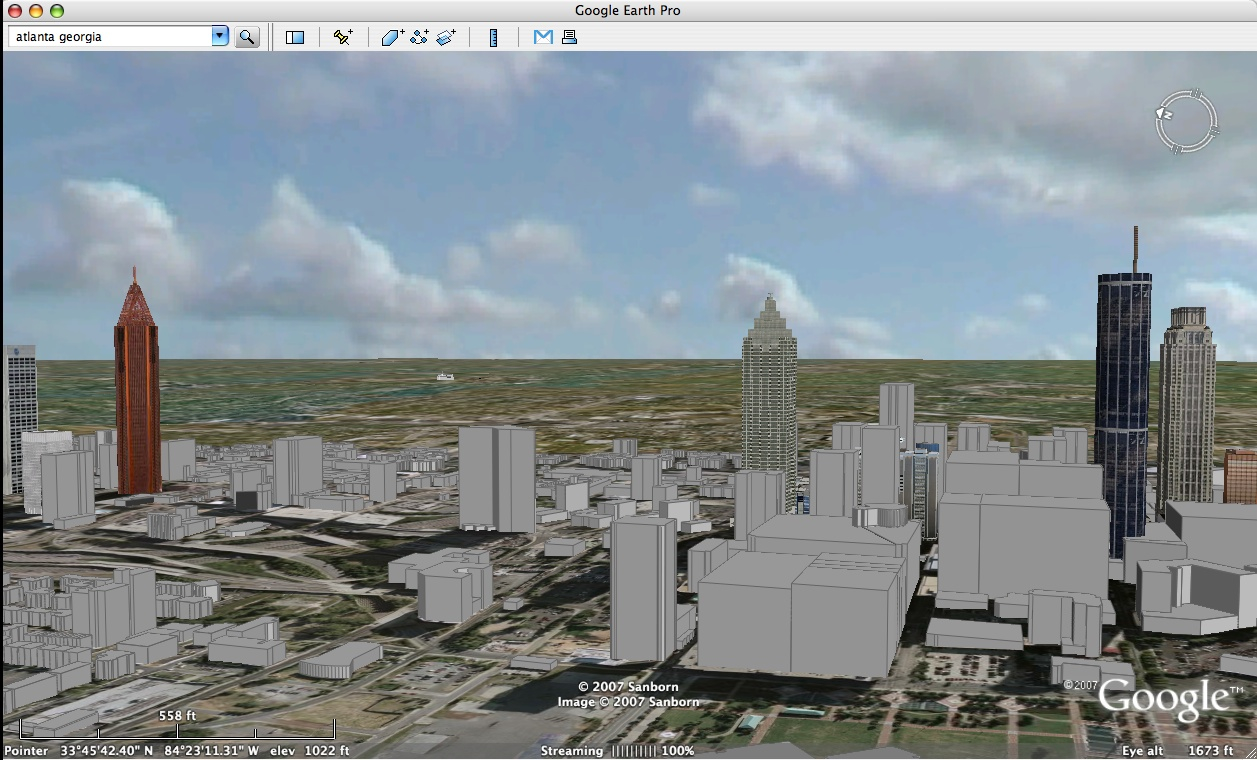
Sky Views in Google Earth

Barnabu blog discusses how to add a sky with clouds over any spot on earth using Google Earth and a network link he has provided. He has created a half dome in Google Sketchup with diameter of 50 miles and placed a cloud texture within the dome. He then made this object a network link which will grab your current view and place the skydome model around that location. I navigated to Atlanta in Google Earth, invoked the skydome link and then turned on 3d images to get this view of Atlanta complete with a cloudy background. Sketchup is an amazing piece of software that teachers and students can utilize in very creative ways.

Screenshot 06

By way of Google Earth Blog...

links for 2007-06-22