Random

Geodata Portal at King's College London

The Geodata portal at King's College in London is a fantastic collection of geospatial applications that can be visualized and downloaded through a Google Earth or Google Maps interface. Region-based network links are used which allow you to zoom into areas of interest to visualise the data. Links are also provided for downloading the raw data in simple formats for use in GIS or remote sensing systems. This is a fantastic resource for the classroom. I spent some time this morning taking a closer look at four of the data sets provided:

NASA Blue Marble, is a natural color mosaic. These data sets show land surface and snow dynamics on the basis of monthly composites of imagery for 2004.

Terrascope, a Google Earth implementation of the LANDSAT MSS, TM and ETM+ ortho mosaics for the 1970s, circa 1990 and circa 2000. It is designed to allow rapid comparison of LANDSAT imagery between these periods for any view in Google Earth. This data sets also includes "a geowiki so that users can move or add information and comments to existing features as well as add new points to the database or comments on visible imagery overlays. All entries are immediately added to the database and visible to all users. Increased functionality (history, edit, delete and classify will be added to the geowiki in due course)"

Amazon-eye, a collection of easily browsable data and imagery on recent environmental change in the Amazon basin as a freely available information source for scientific and conservation users.

Sea level rise scenarios, looks at possible changes to coastlines based on the following sea level changes: Choose the radio buttons to also show modelled new coastlines at the following sea levels:

• -120m - sea levels during the last glacial maximum (approx, 18,000 years ago). • +0m • +1m • +4m

Google Earth Pro
Blue Marble Data in Google Earth

By way of the Ogle Earth

Earth at Night in Google Earth

screenshot_03The Google Earth Blog reports that the NASA layer in Google Earth has been updated and now includes an Earth at Night image overlay for the entire Earth. I've seen maps like this before but to see it overlayed in Google Earth brings a whole new perspective to the experience. Look for it in the Featured Content area of the Layers panel.

Minimap Sidebar for Firefox

minimap"Minimap is a Firefox add-on that gives you a suite of in-built maps and mapping tools for your web browser. Create and save a sidebar map using the addresses or address links you find on web pages (highlight then drag and drop), or by manually adding locations... "

This is a nice add-on for Firefox. Notice that if you visit pages with geo-location information, the geourl is automatically displayed and if clicked on will take you to the specific location referenced by the page you are browsing.

by way of ogleearth

Viddler: Video Sharing Site

Yesterday I stumbled upon a video site called Viddler. Viddler is a video sharing site where you can upload, tag, and share your videos. They offer tagging, video commenting, and linking -- to any moment in video. I spent some time playing around with it and am pretty impressed. In the example below you will notice that i have added comments at several points in the video timeline, and also added a video comment.

Technorati Tags:

Sea Turtles

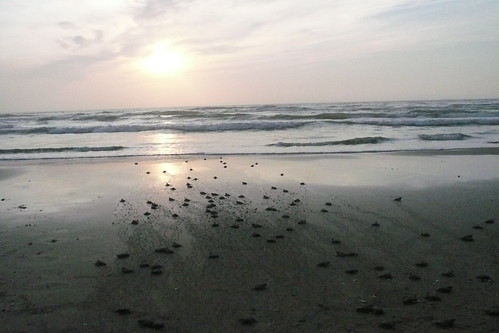
I'm traveling today back to Portland after attending a family wedding on South Padre Island. This morning before heading to the airport I took a walk on the beach and came upon a baby sea turtle release being organized by the Sea Turtle Patrol of South Padre Island. One of the volunteers offered to take my camera take some close up shots. You can follow the image link above to see more photos of the turtle release.

Collaborative Conference Sessions

David Jakes has a post about the use of Skype during NECC sessions to capture thoughts and ideas of audience members (both in and out of the hall). He calls this ChatCast. On the way out of Atlanta, I ran into David at the airport and we talked about this and I mentioned to him a program called SubEthaEdit (you Hitchhiker's Guide to the Galaxy fans like Jim Gates might recognize the name... :-) ). Basically SubEthaEdit is a text editor, but it has the ability to allow folks to connect to, and edit simultaneously, a document. One user creates the document, and allows others to connect to it. The users can connect via an Internet connection, or using Apple's Zero Config Bonjour protocol, connect via a local network. Users can export their document in a number of formats, including HTML which color codes the document additions. It comes with a few nice additions including a note taking template that helps collaborators organize their work.

Subethaedit Chat Log

A nice write up about how this is done with SubEthaEdit, can be found here. Another nice aspect about Bonjour is that you can easily set it up on a local network such as in a classroom, so that if the Internet connection goes down, you can still take advantage of the collaborative nature of this kind of software.

I first saw this used at the O'Reilly Emerging Technologies Conference. I also saw it used at edBlogger SF 2003 (Hosted and organized by Pat Delaney...) . Folks were using this to take collaborative notes and have discussions during talks and panel sessions. It adds an interesting perspective to a conference session, especially if the panel members are also in on the fun. :-)

The collaborative nature of software such as Skype, SubEthaEdit, Instiki (example of use here.) and others, and how we utilize it, can, is, and should change the conference experience. What we saw at NECC this year, was participants beginning to take control of their learning during sessions (rather than just leaving and looking for another talk.)

Google Maps: Drag and Drop Directions

Google Maps has added a feature that allows you to get directions, and then by dragging and dropping points, instantly update and change the route and the information. Great for planning walking field trips at school. For example a popular trip for our teachers is to visit the Cooley Art Gallery at Reed College. Reed is less than a mile away. If you type in a request for driving directions, you get a pretty good route by car, but since we are walking, we need to adjust the map. Just click on the blue route marker and drag and the route is automatically updated. A video from Google below shows how easy this is.

PicLens: Immersive Full Screen Images...

Piclens Screenshot

PicLens is an immersive full-screen experience for viewing photos on the Web. Supports the presentation of images in the following web sites:

  • Flickr
  • Facebook
  • Google Images
  • Yahoo Images
  • Friendster
  • Picasa Web Albums
  • Media RSS

This is a pretty slick little tool for Firefox and Safari. Basically if you are visiting one of the sites listed above, you just need to mouse over an image and click the arron icon to engage the tool. It darkens the screen and the image grows full size to fill the screen. Am thinking this would be great for presentations and classroom demonstrations and such. Throw some images into Flickr, arrange, and you have an instant, low overhead, presentation.

Am thinking this would be great for presentations and classroom demonstrations and such. Just throw some images into a Flickr set and arrange and you have an instant presentation.

By way of Lifehacker...